The assistant in your dashboard
Your dashboard opens to the assistant. Ask it anything about Techy Broker, or tell it what you need, by text or voice, and it runs calculators, research and tools for you and shows the results right in the chat.
Open your dashboardStep by step
- 1
Open the assistant
It's the first thing you see when you sign in, and Assistant at the top of the dashboard menu always brings you back. Your past conversations are listed on the right (behind Conversations on a phone), and New chat starts a fresh one.
- 2
Ask or tell it
Type a question or a job, or tap one of the suggestions made from your own clients. For example: run a seller net sheet for 1011 Windsor Road at $525,000, or where do I change my headshot?
- 3
See the results in the chat
Calculator results, clients and research show up as cards right in the conversation, with the numbers, tables and buttons to adjust the numbers in the full calculator, open the client or download the PDF. When you ask it to take you somewhere, it opens that page.
- 4
Confirm before it saves anything
Before adding or changing a client or property it reads back what it will save and waits for your yes.
- 5
Talk instead of typing
Click the mic to say a message instead of typing it. On Plus and up, the round waveform button next to it starts a live voice conversation: talk naturally, interrupt whenever you like, and it runs calculators, research and tools while you talk, with the results showing up as cards. Pages it would open show as buttons, so the call keeps going. Tap End when you're done, and the transcript and cards stay in the chat.
Basic and Plus
On the free Basic plan you get the basic assistant: it answers questions about Techy Broker and real estate terms, finds your clients and opens pages for you. Chats are short and there's a daily limit.
On Plus and Premier you get the full assistant: long conversations, and it does the work for you, running all 26 calculators, property research, form drafts and branded PDFs, and adding or updating clients.
Your chats
Click the clock to see your recent chats and pick one up again. The plus button starts a new chat. Chats are saved to your account so you can come back to them.
When it can't help
The assistant only answers from Techy Broker's own pages and your data. For questions it can't answer, or anything about billing, legal terms or partnering at eXp, it offers to have our team reach out. It always asks before sending us your details.
Questions
Does voice cost extra?
No. The mic works on every plan. Live voice conversations come with Plus and up, with a daily number of conversations and up to 15 minutes each. Both need microphone access for techybroker.com in your browser.
Can it delete things?
No. It can't delete clients or records, and it asks before pressing any button that saves, sends or buys.
Why did it stop answering?
Every plan has a daily limit, and Basic chats are short. Start a new chat, try again tomorrow, or upgrade to Plus for the full assistant.
Related
Connect Techy Broker to ChatGPT or Claude and ask in plain words, or by voice: look up and update clients, run any calculator with your branded PDF, research a property and start a form draft.
Techy Broker runs an MCP server, the open standard AI agents use to call tools. Point Claude Code, Cursor, an agent you build or any MCP client at it, and it can work with your clients, calculators, research and forms.
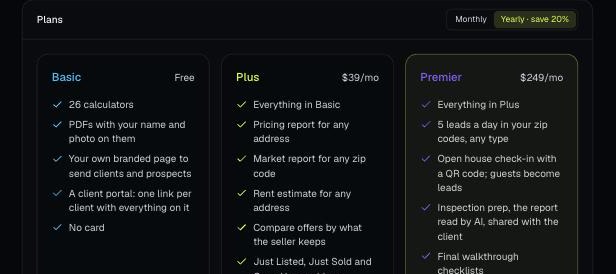
There are four plans: Basic, Plus, Premier and Partner. Change your plan, update your card and see invoices from Billing.