Use Techy Broker in ChatGPT and Claude
Connect Techy Broker to ChatGPT or Claude and ask in plain words, or by voice: look up and update clients, run any calculator with your branded PDF, research a property and start a form draft.
Open your accountStep by step
- 1
Find the server address
Open Account in your dashboard and scroll to AI assistants. Copy the server address: https://techybroker.com/api/mcp.
- 2
Add it to Claude
In Claude, open Settings, then Connectors. Add a custom connector named Techy Broker with that address, and click Connect.
- 3
Or add it to ChatGPT
In ChatGPT, open Settings, then Apps & Connectors. Create a connector named Techy Broker with that address and choose OAuth.
- 4
Sign in and allow
A Techy Broker window opens. Sign in if asked, read what the assistant will be able to do, and click Allow.
- 5
Ask for what you need
Turn Techy Broker on in a chat and ask, for example: run a seller net sheet for the Patel listing at $525,000 and give me the PDF.
What you can ask for
The assistant acts for you, with your account and your plan, the same as the dashboard.
- Clients and properties: find a client, see their details and properties, add a client or property, or update one. The assistant reads back what it will save first.
- Calculators: every Techy Broker calculator, from the seller net sheet and mortgage payment to cash to close, rent vs. buy, investment property, 1031 exchange and commission splits. Ask for the PDF to get a link to your branded report.
- Property research: flood risk from FEMA, plus school district, zoning, permit history and tax history (Plus and Premier). The slower lookups can run in the background while you keep talking.
- Forms: search the standard forms for your state and start a draft in Form Filler with the client, property and your details filled in.
Results and PDF links
Every calculator run and research lookup an assistant makes is saved to Results in your dashboard, under the client when you name one, just like work you do yourself. The reply links straight to it.
When you ask for a PDF, the assistant gives you a link to your branded report. It opens for anyone you send it to, without signing in, for 30 days, and you can always download it again from Results.
What it can't do
Nothing can be deleted through an assistant. Form drafts are only started: you review every field, edit and sign in Form Filler. The assistant never picks or suggests contract terms.
Privacy and disconnecting
You sign in to Techy Broker yourself and the assistant never sees your password. Techy Broker receives only what each request contains, not your conversation. What a tool returns goes to the assistant's provider under their privacy policy. See our Privacy Policy, section 5.3.
To disconnect, open Account, then AI assistants, and remove the connection, or remove it in the assistant's settings. Signing out of all sessions or changing your password ends every connection.
Questions
Which plan do I need?
Connecting is free on every plan, and the calculators, clients and PDF reports work on Basic. Research and forms follow the same plans as on the website; the assistant tells you when something isn't in your plan.
Are the numbers the same as on the website?
Yes. The assistant runs the same calculators, with the same math, and the PDF is the same report you'd download from the page.
Does it work by voice?
Yes. Results are written to be read aloud, and the assistant confirms names, numbers and addresses before it saves anything.
It says my connection was invalidated.
Reconnect Techy Broker in the assistant's connector settings, then start a new chat.
Who do I contact for help?
Email service@techybroker.com.
Related
Techy Broker runs an MCP server, the open standard AI agents use to call tools. Point Claude Code, Cursor, an agent you build or any MCP client at it, and it can work with your clients, calculators, research and forms.
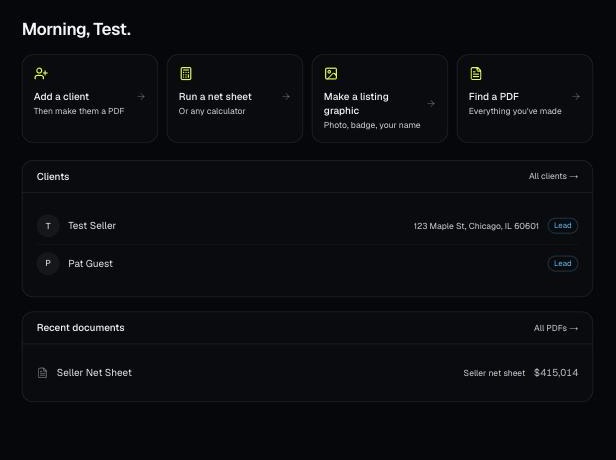
Make a free account, add your brand, and make your first PDF. This is the short path from sign-up to sending a client something with your name on it.
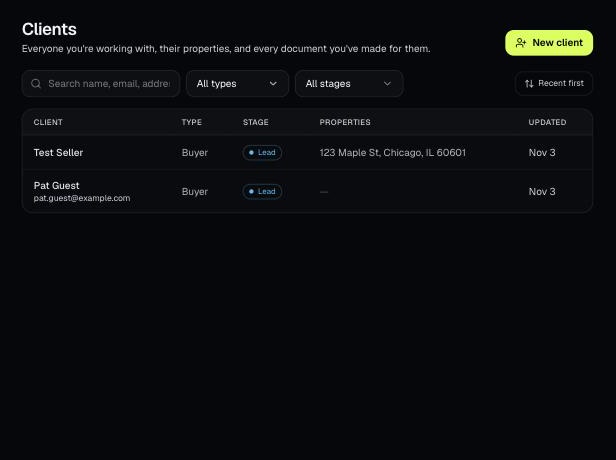
Clients holds everyone you work with, their properties, and every document you've made for them. Tools open prefilled from a client's property.